Export Selected To OBJ
This Python script for Modo exports the selected layer or layers of geometry to an OBJ file.
I use this to quickly bring out layers as separate OBJ files so I can get them into ZBrush as SubTools. Maybe GoZ will render this script useless for me when GoZ is finally released for the Windows platform - I don't know, but until then this script is saving me quite some time in my daily work.
Usage
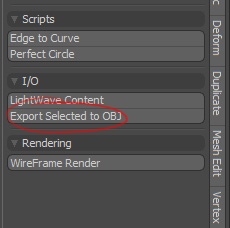
For simplicity you can assign the script to a button for easy access to it. Like in the screenshot to the right.
And that's pretty much it - selected the layer you need to export, click the button and enter a filename for your OBJ export and you're done.
Hope some of you find this script useful.
Download
Available downloads for Export Selected To OBJ.
Latest Release
Installation
Copy the js_exportSelectedToObj.py file to Modo user scripts folder. In Windows Vista you find it here:
C:\Users\<user name>\AppData\Roaming\Luxology\Scripts\Compability
Export Selected To OBJ has been tested with modo 401.
Changelog
The development history of Export Selected To OBJ.
Version 1.0 - 30 Sep 2009
- Release of version 1.0.
Export Selected To OBJ
- Initial Release
- Sep 30, 2009
- Latest Release
- Sep 30, 2009
- Host
- Modo
- Operating System
- Cross-platform
- Language
- Python
- License
- New BSD License »
- Links
- Download »
Legacy comments
 nickOct 15, 2010This is great :) Saving me loads of time. Thanks
 R-IckMay 3, 2011How can I assign the script to a button in modo?
 Johan SteenMay 3, 2011 // reply to R-IckHi,
Go to the form editor and locate the form where you want to put the button. Create a new control in the form you want it, and in the command field for this new control/button enter @js_exportSelectedToObj.py and you should have a basic button for the script in place.
