Open FiberFX
Here's a small LScript, which simply allows you to add FiberFX to your layout menus.
If you use FiberFX often like I do, it can come in handy. It's much faster to have FiberFX attached to a button than to have to Ctrl+F8, drop down the menu, select FiberFilter then double click. This script does that, and when FiberFX is added to the scene, it opens the FiberFX panel with the button. I find it to be a convenient time saver and I have added it to my Workflow tab in Layout where I have all my most used tools collected.
Usage
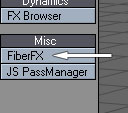
It's not much to say about the usage, just add the command to a convenient spot in your layout menu and you are ready to go.
To assign it to a button go to the Configure Menus window -> Command List -> Plug-ins -> JS_OpenFFX, and assign it to a tab where it makes sense for you.
That's about it. Hope some of you find this tool useful.
Download
Available downloads for Open FiberFX.
Latest Release
Installation
- Copy the JS_OpenFFX.ls to LightWave's plug-in folder.
- If "Autoscan Plugins" is enabled, just restart LightWave and it's installed.
- Else, locate the "Add Plugins" button in LightWave and add it manually.
Compability
Open FiberFX has been tested on LightWave 3D 9.6, Win64. As far as I know it should also work fine on Win32 and MacOS.
Changelog
The development history of Open FiberFX.
Version 1.0 - 7 Jan 2009
- First public release of the plugin.
-
Open FiberFX
- Initial Release
- Jan 7, 2009
- Latest Release
- Jan 7, 2009
- Host
- LightWave 3D
- Operating System
- Cross-platform
- Language
- LScript
- License
- New BSD License »
- Links
- Download »