Render Presets
Render Presets lets you manage a library of different common rendering related settings in LightWave 3D to quickly organize, apply or switch between them.
Render Presets is a plugin written in Python for LightWave 3D, originally created when working on a project that had me switching between a couple of different rendering settings for the same scenes over and over again. The initial iteration only contained the settings I switched between then, but for the public release most of LightWave's common render settings are included. More settings might be added in the future when time permits.
Usage
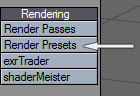
Render Presets consists of two plugins, the main plugin is a master class plugin, which manually can be started by adding it from the Master Plugins window in LightWave. Though, for convenience I've added a companion plugin which can be added to LightWave's menus, like in the screenshot to the right, or mapped to a keyboard shortcut. The sole purpose of this companion plugin is to automatically start the Render Presets plugin and open it's window.
Workflow
Render Presets open in a non-modal window so you can keep it open while you work if you have the need to keep changing settings often.
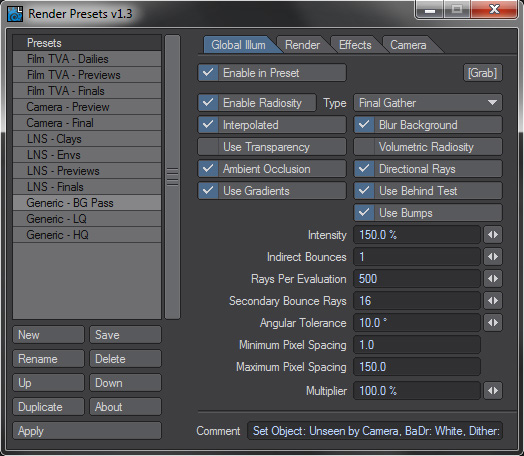
Each section in the settings is preceded with a "Enable in Preset" checkbox, which lets you to decide what options you want to include when you apply the preset. This allows you to make very specific presets, like a preset that only applies to the Camera, or a preset that only changes the Global Illumination and Render settings and so on.
Main Buttons
The main buttons are pretty self-explanatory, but here's a quick run through.
- New: Adds a new empty preset to the list.
- Save: Saves the presets to disk. The plugin automatically saves the presets when you remove it or quit LightWave, though you can still use this to save, just in case.
- Rename: Renames the selected preset.
- Delete: Deletes the selected preset.
- Up/Down: Moves the selected preset in the list, to organize the order.
- Duplicate: Duplicates the selected preset to use as a starting point for a new entry.
- About: The logo from this website. Outstanding feature!
- Apply: Applies the selected preset to the scene.
There's a comment field at the bottom of the settings section, where you can type something clever or useful about the preset.
Additional
Just some additional information that can be good to know about the plugin.
- If the Camera settings is enabled in the preset, and the scene contains more than one camera, a window will popup when you apply the preset that let's you select which camera to apply the preset to, so you don't accidentally apply it to the wrong camera.
- If you have the settings in the Render Tab enabled and apply the preset, you might be fooled that Render Lines and Depth Buffer AA wasn't applied if you have LightWave's Render Globals » Render Tab open at the same time.
Don't panic! They were applied, LightWave just doesn't refresh its GUI for these two checkboxes for some reason when they are changed from the outside. Switch to another tab and back again in Render Globals and you'll see that they have been updated. - Sky Squeeze and Ground Squeeze are only applied if you use LightWave versions above 9.6 (9.6.1 OB or HC).
- The Camera Settings are not designed to work with the Classic Camera.
That's about it, happy preseting!
Download
Available downloads for the Render Presets plugin.
Latest Release
Older Releases
- Download 2.0 - 23 Apr 2012
- Download 1.3 - 28 Jun 2011
- Download 1.2 - 1 Jun 2010
- Download 1.1 - 27 May 2010
- Download 1.0 - 7 Mar 2010
Source Code
Render Presets is released as an open source project under the new BSD License. The project is hosted on GitHub where the repository can be browsed or forked.
Or use git to clone the repository with complete history:
git clone git://github.com/artstorm/render-presets.gitContribute
I'm very interested in your contributions... What else deserves to be in this plugin? How can it be improved? Coders, feel free to fork the repository, make any updates and then send me a pull request. Non-coders, submit a request in the issue tracker.
Support
There is no official support for this plugin, but if you run into any problems or bugs, you can file a report in the issue tracker and it will be looked into. You need to have a Google Account to file a new issue.
Compability
Render Presets exists in an older LScript version and a newer maintained Python version.
Version 2.0 and newer is written in Python and requires LightWave 11.0 or greater.
Version 1.x is written in LScript and is no longer maintained. For users still on LightWave 9.x and 10.x.
Changelog
The development history of Render Presets.
Version 2.0.1 - 15 Dec 2012
- Fixed bug with presets being referenced instead of copied when duplicating.
Version 2.0 - 23 Apr 2012
- Rewrote the plugin in Python and deprecated the LScript version.
- Added new settings introduced with LightWave 3D 11.0: Shading Samples, Light Samples, Camera Min/Max Samples.
- Default values updated to reflect defaults in LightWave 3D 11.0.
Version 1.3 - 28 Jun 2011
- Fixed Issue 1: Attempt to access undeclared array selectedPreset when running under LightWave 10.0 and 10.1.
- Implemented Issue 2: Duplicate presets button.
- Minor fixes for running the script uncompiled.
Version 1.2 - 1 Jun 2010
- Added a [Grab] button on the Global Illum Panel to copy the current GI settings from the scene.
Version 1.1 - 27 May 2010
- Fixed a bug that could cause a preset to be cleared when closing/opening the window.
- Added a preset option for Camera Resolution Multiplier.
Version 1.0 - 7 Mar 2010
- First public release of the plugin.
Render Presets
- Initial Release
- Mar 7, 2010
- Latest Release
- Dec 15, 2012
- Host
- LightWave 3D
- Operating System
- Cross-platform
- Language
- Python (v2.0x)
- LScript (v1.x)
- License
- New BSD License »
Legacy comments
 PhilMar 8, 2010You are my personal hero, sir.
 AliMar 9, 2010Thanks a lot, you are a very generous person Johan.
 LuísMar 24, 2010is it possible to also choose camera settings? like resolution multiplier?
 JohanMar 24, 2010 // reply to LuísHey,
At the moment, only antialiasing related settings are available for the camera.
But I could update it with resolution settings like multiplier and frame size.
Cheers,
Johan- JohanMay 27, 2010 // reply to LuísResolution Multiplier is added in version 1.1. Enjoy. :)
More resolution related settings will come in a future update.
Cheers!

- JohanApr 15, 2010 // reply to dogbiteWell, that would be my Render Pass and layer manager. :)
If time permits I've planned to get it into a releasable state as well. heshamApr 26, 2010 // reply to Johanplease ;-)
- heshamMay 6, 2010 // reply to Johanwhen :-)
 markus groeteke/ 3dworksApr 13, 2010great addition!!! thanks for developing and sharing!
markus
 Matt GornerMay 26, 2010This is a fantastic plugin (something I was going to look at writing myself). I am however experiencing issues with the presets not loading when you click on the name.
The preset names are there clear as day in the list, but when I click on my 'High Quality' one (which happens to be last in the list) it doesn't appear to load it. As all the settings are greyed out because GI is off.
Am I doing something wrong?- JohanMay 26, 2010 // reply to Matt GornerHey Matt,
Even though it's been tested quite a lot to be solid, things can slip through, so it could be a bug or some combination I've missed.
In your LightWave's config folder you've have a JS_RenderPresets.cfg file containing all defined presets, if you could send that file to me, I'll take a look and see what might have gone wrong.
Cheers,
Johan- Matt GornerMay 27, 2010 // reply to JohanWhoohoo! Fixed! Thanks Johan, this script is very useful indeed, will be using this a lot!
 DinoDec 5, 2012Firstly just wanted to thank you for this great little script, a much needed addition to the Lightwave 3D package. One that should be included as a standard feature in my own opinion especially now it's at version 11. Just a couple questions if you wouldn't mind. Am I doing something wrong or is this a known bug when using this script in Lightwave 11.0.3..... When duplicating a preset, any changes to the duplicated preset also effects the original preset. Also I'm trying to setup a way to sync my render presets between 2 computers, where might I find the preset files location?
Many thanks,
Dino.- Johan SteenDec 14, 2012 // reply to DinoDino,
Thanks for your comment. I can reproduce your issue with the duplication of presets, and I will have that fixed for the next minor update. To sync your presets between two or more computers you will find the presets stored in a file called "js_render_presets.cfg" and it's located in the same folder that LightWave stores all other configurations files. I believe that should be "C:\Users\{username}\.NewTek\LightWave\{lightwave version}\configs" unless you have redirected your config path.
Cheers,
Johan- DinoJan 15, 2013 // reply to Johan SteenPerfect.. Thanks Johan

 Shawn (Redbone)Jan 19, 2014I really think this is a great utility for LW. I just want to thank you for allowing others to use it also. I am constantly changing render settings and I always wondered how to tell L script how to save it as a batch or macro and walla I found your project. Cheers! I will say having some of the resolution, frame sizes and some of the other options with the lighting would be extremely beneficial. But besides the point, thanks so much I like it....
Let me know If I can assist in testing it for you.- Johan SteenJan 20, 2014 // reply to Shawn (Redbone)Hey thanks!
I am always happy to hear when people get use out of these tools. About future versions, I have an update planned, with a few bug fixes of problems that exists in the current version, and I'd at the same time probably add some new features as well.
Though I don't dare to say when, I have been so busy for a while so I've had about no time to squeeze an update of this script in. But it will come at some point, hopefully not too far away.
Cheers!